

Connect your Partner API token and it tracks installs, uninstalls and active stores per app — then lets you build email flows, sequences and campaigns that fire off those events.
- Install & uninstall tracking
- No-code email automation
- Self-hosted, MIT licensed
Every install and uninstall lands here first. This is the stream your flows, sequences and campaigns fire from.
- Installs today
- 71
- Uninstalls
- 14
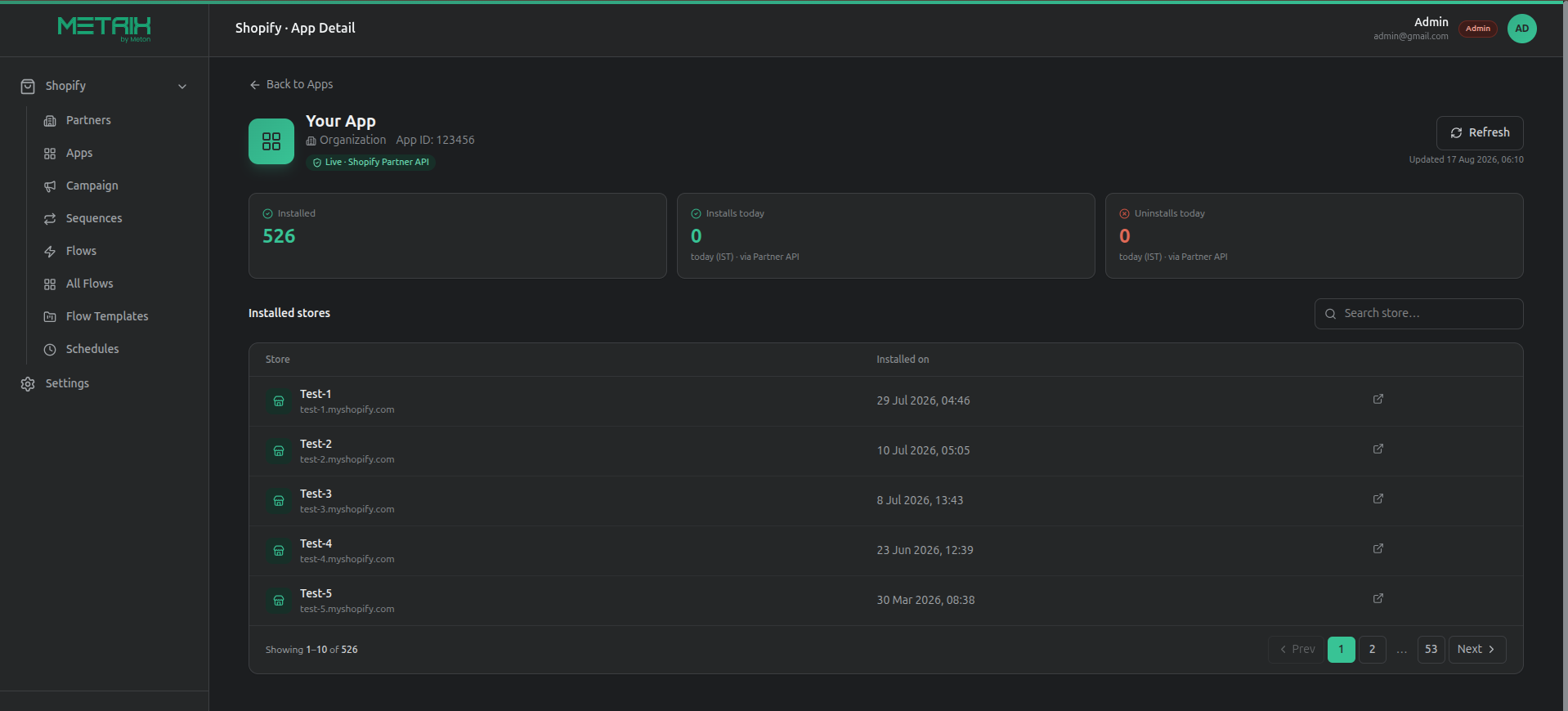
They all read from the same Partner API sync — so a condition you write in one is true everywhere. Pick a module to see what it holds.
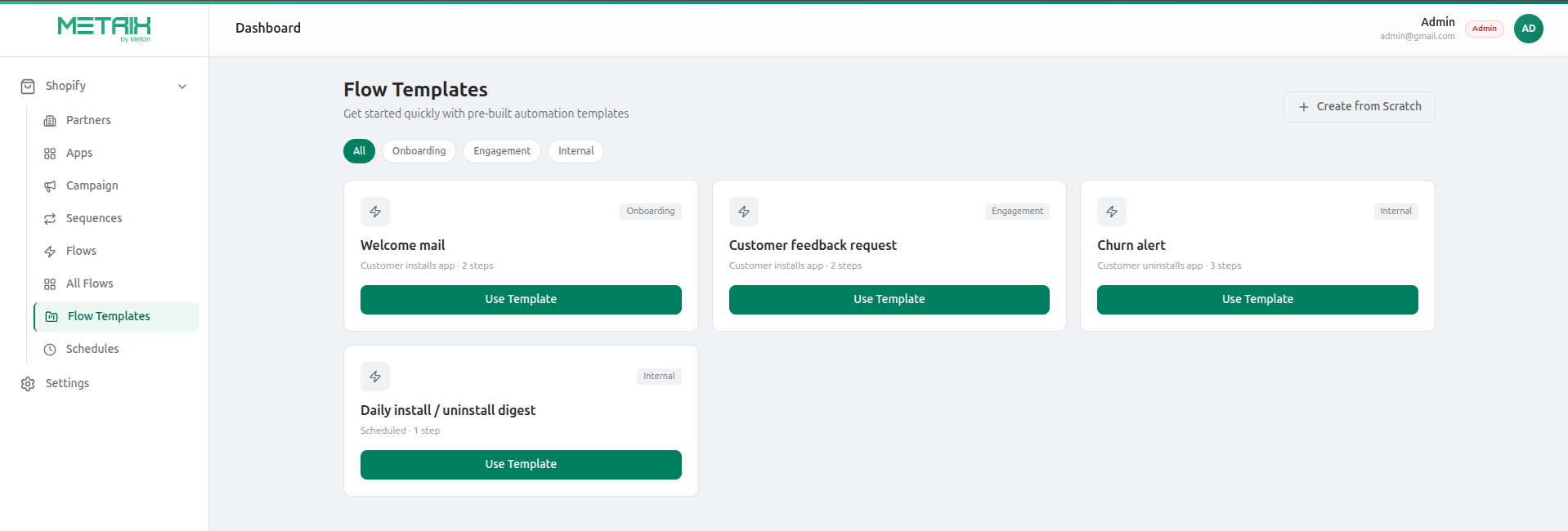
Start from a template — welcome mail, feedback request, churn alert, daily digest — or drag out your own trigger, conditions and actions on the canvas. Every action can carry a delay before it fires.
Open the flow builderKept current automatically from real Partner API revenue transactions — and the data every Flow condition reads from.
- No longer needed42%
- Too expensive23%
- Switched app19%
- Other / no reason16%
Shopify’s own categorized churn reason, alongside the merchant’s free-text feedback — enriched with plan, usage duration and last active user.
Custom fields & timeline
Define your own field types — text, number, date, boolean — and log free-form notes against a store's activity timeline.
Your own fields
Tags, notes and an assigned account owner, which the sync never overwrites.
Revenue ledger
Every subscription, usage charge, one-time charge, credit and adjustment synced into a local ledger.
Drag out a trigger, add conditions and actions, connect them on a canvas. Every action can carry a delay — minutes, hours or days — before it fires.
Customer uninstalls
MRR is greater than 0
Gate — all must match
Send win-back email
Delay: 1 hour
Create follow-up task
Delay: 1 hour
Triggers
Customer installs app
A merchant adds one of your apps
Customer uninstalls app
The app is removed from a store
Subscription activated
A paid plan begins
Subscription cancelled
A paid plan ends
Scheduled (timer)
Hourly, daily or weekly
Conditions
Gate any branch on the merchant’s own data, matching all (AND) or any (OR) of a rule set.
Operators
is · is not · contains · greater than · less than
Actions
Any action can carry a delay — minutes, hours or days — before it fires.
Flow templates
Clone Welcome mail, Feedback request, Churn alert or Daily digest.
Shared schedules
One named timer — hourly, daily, weekly — reused by any number of flows.
Run overview
Active flows, total runs, success rate and a live feed with per-step logs.
Email content
Built-in template, saved template, or a custom subject and body per step.
A sequence sends a fresh email, then follow-ups — but only to contacts who stayed quiet. Choose how stores get enrolled:
- Day 0
Fresh email
Sent to the whole batch
- Day 3
Follow-up one
Only to contacts who stayed quiet
- Day 7
Follow-up two
Last touch, then the batch closes
A store that opens or replies is retired from the sequence immediately.
Next batch opens automatically once the gap elapses.Orange figures are drop-off between stages. 54 contacts were never sent to — they had already engaged, so the sequence retired them.
Open-tracking pixel
Fires the moment the email is rendered.
Provider webhooks
Opens, clicks, unsubscribes and bounces, straight from Brevo or your SMTP provider.
Mailbox reply detection
Reads a connected mailbox — delivery providers can't see replies that land in an inbox.
Import
.xlsx or .csv, parsed in the browser
Compose
Template, subject, sender, email column
Target
Everyone, a random sample, or hand-picked
Send
Now or scheduled, with live progress
Brevo or SMTP
Use the Brevo API, or point at any SMTP server — Gmail, Zoho, Outlook, Postmark, or your own. Both sets of credentials stay on file, so switching is instant.
Sender management
Verified from-addresses import automatically from Brevo, or add any address by hand for aliases and domain relays.
- support@yourapp.com
- hello@yourapp.com
Reusable layouts & templates
Shared header/footer layouts and saved templates with merge variables, so every send stays on-brand without rebuilding HTML.
Safe testing mode
An optional redirect-everything-to-one-address setting for staging, so test sends never reach real merchants.
Saved segments
Filter by status, app, tag, country or minimum MRR — the same filters that power Flow conditions.
Uninstall enrichment
Point the dashboard at your app's shop-lookup API and it pulls install date, plan, usage duration and last active user into every uninstall email.
GET /shop-lookup → 200 OKPrograms, referral codes, payouts and disputed claims. The data model and API are complete, but no admin screen ships for it yet.
Programs
Percentage or fixed commission, a configurable referral cookie window, active/paused status.
Affiliates & referrals
Unique referral codes, tracked sale amount and derived commission per referral, approve/reject workflow.
Payouts & claims
Mark payouts paid, and review affiliate-raised credit disputes.
- GR$8,420
Growth Guild
32 referrals
- AP$4,960
App Stack Weekly
19 referrals
- CO$3,740
Commerce Crew
15 referrals
The dashboard, its database and every Partner API token stay on infrastructure you control. Nothing is relayed through a service we run — because there isn’t one.
The browser
- A session cookie, and nothing else
- No password
- No Partner API token
- No database access
Your server
- The dashboard app
- Your MySQL / MariaDB database
- Partner API tokens
- Email provider credentials
Shopify Partners
- Read-only Partner API calls
- Install, uninstall and revenue events
What happens to a token
You paste it once
Entered on the connected-partners screen.
It is written server-side
Straight to your database. It is never echoed back.
You only ever see it masked
Any later view shows the masked form below.
shpat_••••••••••••••••••••7f3a
Who can see what
| Capability | Admin | Standard |
|---|---|---|
| View apps, stores and churn | ||
| Build flows, sequences, campaigns | ||
| Read customer records and revenue | ||
| Manage connected partner organizations | ||
| Add or revoke Partner API tokens |
Two roles, no permission matrix to maintain — auditable by reading one column.
Common questions
Can anyone else see my Partner data?
There is no hosted service in the path — no copy of your data exists anywhere but the server you installed it on. Nothing is relayed through us, because there is no “us” to relay through.
What does the browser actually store?
One signed, httpOnly session cookie. Because it is httpOnly, page scripts cannot read it; because it is signed, it cannot be edited into a different session.
How do I rotate a Partner API token?
An admin replaces it on the connected-partners screen. The stored value is never echoed back to the browser, so the only way to change it is to enter a new one.
Who can connect or remove an organization?
Admins only. A standard user can read every app, store and flow, but never sees the partner-management screens at all.
No coding required to run it. The first install takes about 30–45 minutes, on a single small server you control.
Connect a Partner API token
From Partners → Settings → Partner API clients in your Shopify Partner account. Connect as many organizations as you run.
Pick an email provider
Brevo or any SMTP server. Credentials for both are kept on file, so switching providers later is instant.
Let it take over
In production it refreshes itself every 5 minutes. The on-screen Sync button is only for forcing an immediate update.
Nothing on this page promises a screen that doesn’t exist yet. Here is every area of the product and exactly how far along it is.
The four modules you would actually use day to day are complete. The gaps are all in places with no screen attached.
Shipped — A full screen you can open and use today.
Apps & stores
Apps
Live counts, per-store detail, uninstall reasons.
ShippedFlows
Flows
Visual builder, templates, shared schedules, run logs.
ShippedSequences
Sequences
Imported sheet and merchant-triggered drips.
ShippedCampaigns
Campaigns
Import, compose, target, send or schedule.
ShippedEmail delivery
Settings → Email
Providers, senders, layouts and templates.
ShippedCRM & revenue sync
Behind Flows
Powers every Flow condition, but has no customer-list page of its own yet.
BackendAffiliate programs
No screen yet
Programs, referral codes, payouts and claims exist as a complete data model and API.
API only
Affiliate programs are the one area to treat as coming soon — the model and API are finished, but there is no admin screen to point anyone at yet.
Still unresolved? The source is public — read the part you are unsure about, or open an issue.
Read the sourceWhat is Metrix by Meton?
A self-hosted, open-source dashboard that gives Shopify app developers install analytics and event-based email automation in one tool.
What can I track with Metrix?
Installs, uninstalls, active stores per app, and a customer record for every store that touches your app.
Is Metrix self-hosted?
Yes. It runs on your own infrastructure, so you own all install and customer data.
Can I send emails from install events?
Yes. A no-code builder lets you create drip campaigns and flows triggered by install and uninstall events, and sequences can stop when someone replies.
Do I need a separate email tool?
No. Analytics and email automation are built into the same dashboard.
Metrix by Meton · Self-hosted · MIT
Point it at your Partner account and you have live install tracking the same afternoon — then build the first flow whenever you are ready.
Before you start
4 thingsA Shopify Partner account
With Partner API access enabled
A small server you control
One box is enough — pm2 and nginx
MySQL or MariaDB
The dashboard brings its own schema
An email provider
A Brevo key, or any SMTP credentials
Have all four and setup is a form, not a build. Miss one and it will still install — it just won’t sync until you add it.